Download PHAx
Process Hazard Analysis software
PHAx runs on your own computer. Your studies are files on your own computers and drives, and they are never sent to Arborion Global. To use PHAx you sign in with an Arborion account whose e-mail address is on your organisation's PHAx licence or on a trial. What PHAx does.
macOS
Requires macOS 11 or later, Apple silicon. Installer: .dmg disk image.
The macOS installer is sent to licensed users and trial users directly. Request the macOS installer and tell us your organisation and the e-mail address to put on the licence.
- Open the downloaded .dmg disk image.
- Drag PHAx to the Applications folder.
- Open PHAx from Applications. .phax study files open in PHAx from then on.
Windows
Requires Windows 10 or 11, 64-bit. Installer: setup .exe, installs for the user without administrator rights.
The Windows installer is sent to licensed users and trial users directly. Request the Windows installer and tell us your organisation and the e-mail address to put on the licence.
- Run the downloaded PHAx setup program. It installs for your user, so no administrator rights are needed.
- If Windows SmartScreen says "Windows protected your PC", choose More info, then Run anyway. Do this only for an installer downloaded from this page.
- Open PHAx from the Start menu. .phax study files open in PHAx from then on.
First start
- PHAx shows its Terms of Use and Privacy Statement. Read and accept them to continue.
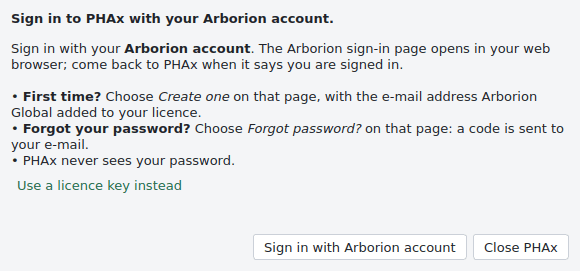
- Choose Sign in with Arborion account. The Arborion sign-in page opens in your web browser. The first time, choose Create one with the e-mail address on your licence. A forgotten password is reset on the same page, and PHAx never sees the password.
- After each online check PHAx works offline for 7 days. Only the licence check goes over the internet, never study content.
Using PHAx is subject to the PHAx Terms of Use and the PHAx Privacy Statement. Questions: info@arborionglobal.com.