Skip to content
Digital Tools and Software

Hazard study software

PHAx

Process Hazard Analysis Software

HAZOP, What-If, HAZID and LOPA on your own desktop, for macOS and Windows.

Download for macOSmacOS 11 or later, Apple silicon
Download for WindowsWindows 10 or 11, 64-bit

Free trial: start it in PHAx after you download it. More users, a partner deal or a special arrangement? Ask Arborion

Version 1.0.3. Create your Arborion account in PHAx and PHAx activates automatically; each computer uses one seat of your licence or trial. Sit in on a demonstration

Desktop software for HAZOP, What-If, HAZID and LOPA, where the screen is the study record

PHAx is built for the scribe and the facilitator in the room. The team's words go straight into a worksheet that behaves like a spreadsheet, ranked in your own risk matrix, with safeguards, LOPA and actions linked to the scenario they came from. Every value on the screen can be traced to a session, a person and a saved version. We chair hazard studies ourselves, and PHAx is the tool we record them in.

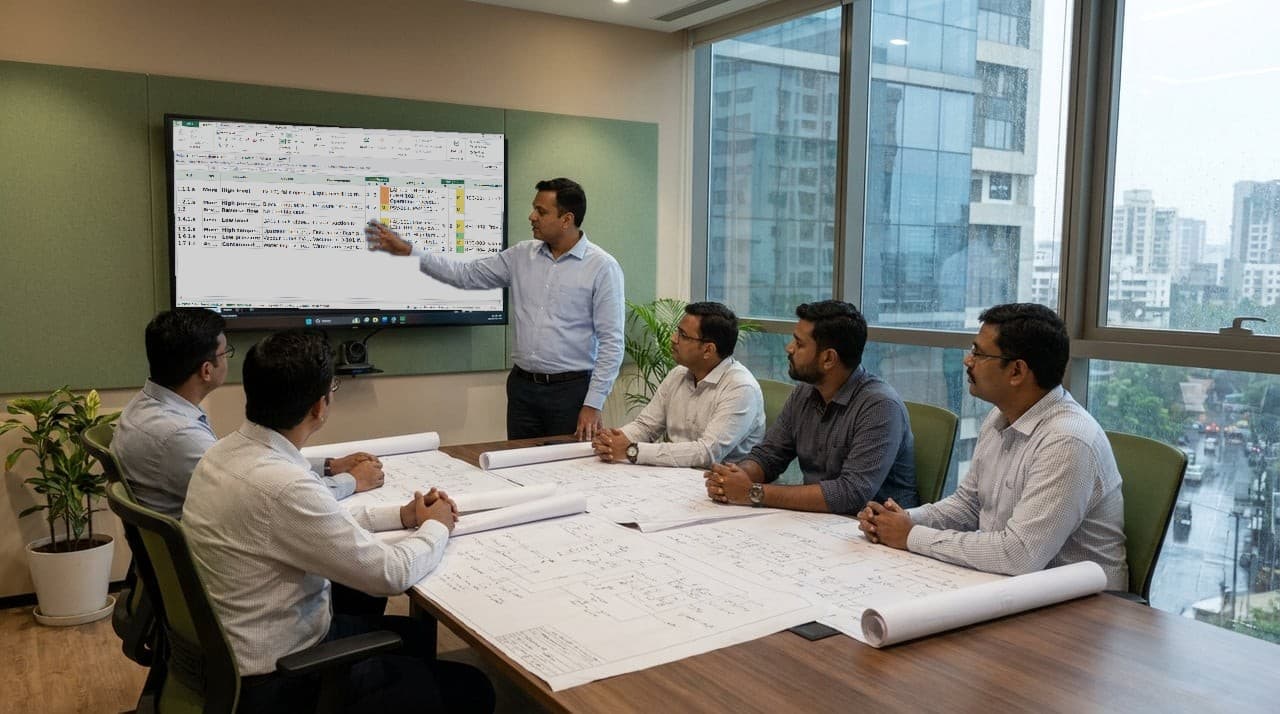
A hazard study session, the chair working through the PHAx worksheet on the wall display while the team follows on printed drawings

Inside PHAx

The screens below are PHAx itself, showing an illustrative example study that describes no real plant. One study file carries the record from node to closed action, so nothing is copied between spreadsheets.

Study basis, nodes and drawings

Carries forwardnodes with their drawings and revisions

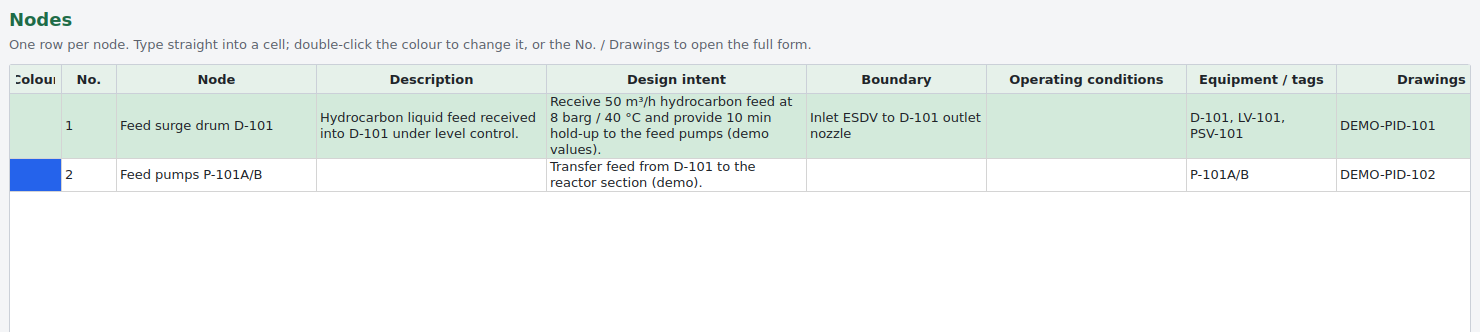
Scope, boundaries, team, sessions and attendance sit in the study. Nodes are one row each, with design intent, boundary, operating conditions, equipment and their drawings. P&IDs are imported in bulk and each node is marked on them in its own colour, and the marked-up drawings are written to the project folder as images and one combined PDF.

PHAx: Study basis, nodes and drawings

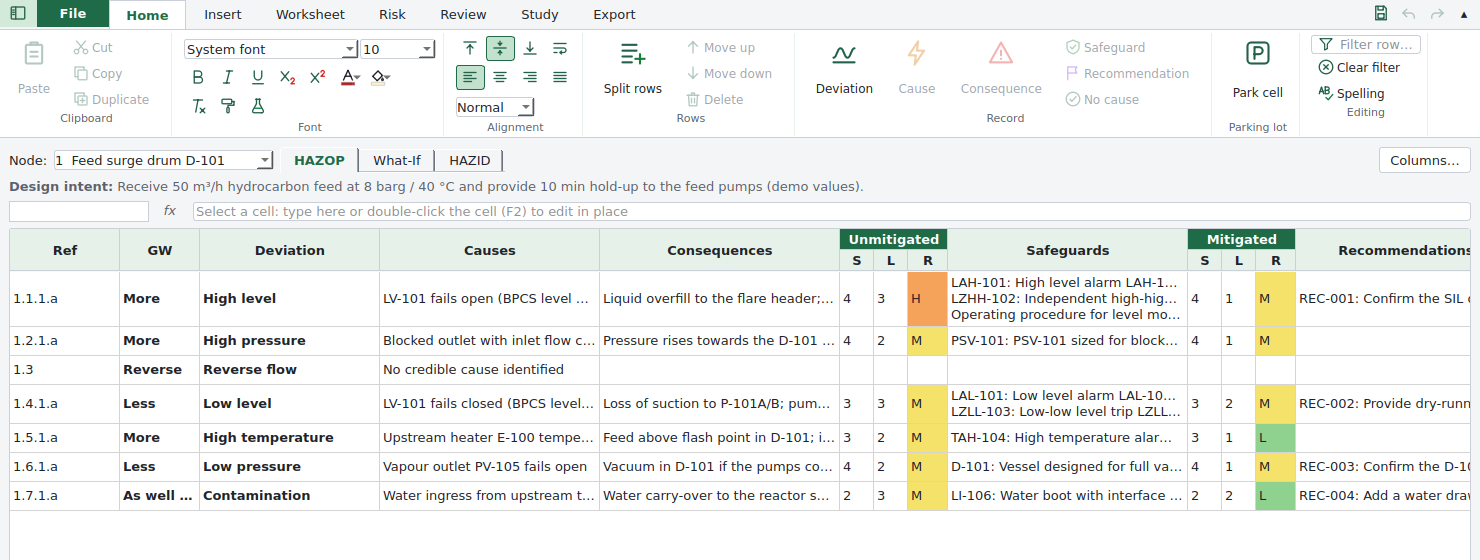
HAZOP, What-If and HAZID worksheet

Carries forwardone row per scenario, ranked before and after safeguards

A flat grid with one row per scenario. The deviation and the cause are written once and merged down over their rows, so the sheet reads the way the team talked it through. Type in the cell, split a cell into more deviations, causes or consequences, and put several safeguards or recommendations in one cell, one per line. Columns can be added, renamed, reordered or hidden per method.

PHAx: HAZOP, What-If and HAZID worksheet

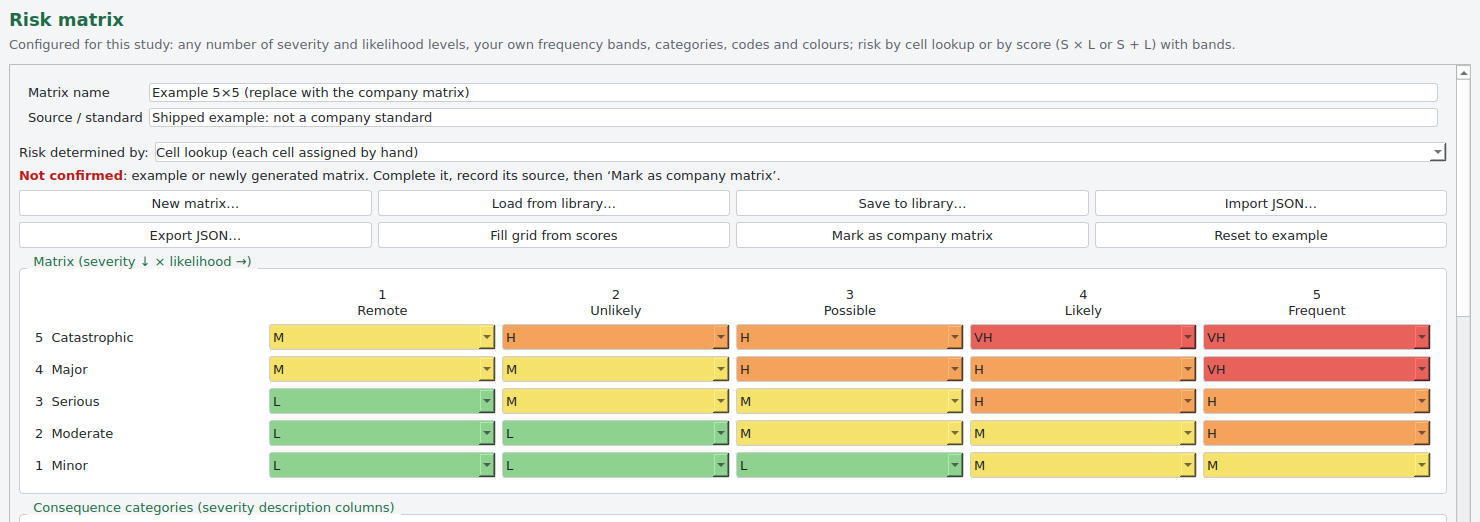
Risk ranking in your own matrix

Carries forwardthe company's own risk levels and required actions

The risk matrix is yours: any size, your severity and likelihood levels, frequency bands, consequence categories, colours and required actions, with risk found by cell lookup or by score. Each scenario is ranked before and after safeguards. The shipped matrix is marked as an example, and PHAx keeps flagging it until the company matrix replaces it.

PHAx: Risk ranking in your own matrix

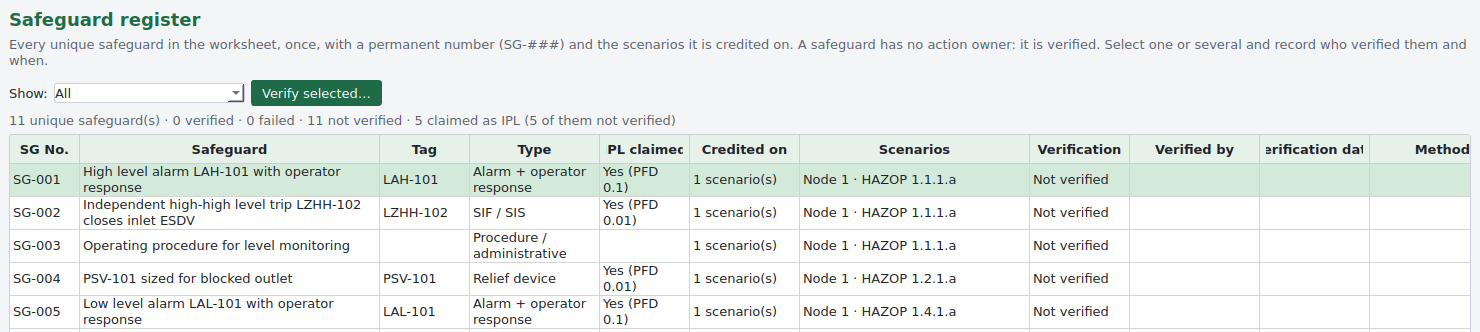
Safeguard register

Carries forwardSG numbers, IPL claims and verification

Every unique safeguard is held once, as SG‑###, with the scenarios it is credited on and whether it is claimed as an independent protection layer with a PFD. Safeguards are verified rather than owned: verified or failed, by whom, on what date and how, for one safeguard or many at once.

PHAx: Safeguard register

LOPA worksheet

Carries forwardIEL, required PFD, RRF and SIL band

Send to LOPA turns the selected scenarios into LOPA rows and carries their claimed layers across. Enabling conditions, conditional modifiers and protection layers sit under heading bands, each with its value and description. PHAx works out the intermediate event likelihood, the target, the required PFD, the risk reduction factor and the SIL band. A layer is credited only when it is independent, specific and auditable and has a PFD.

PHAx: LOPA worksheet

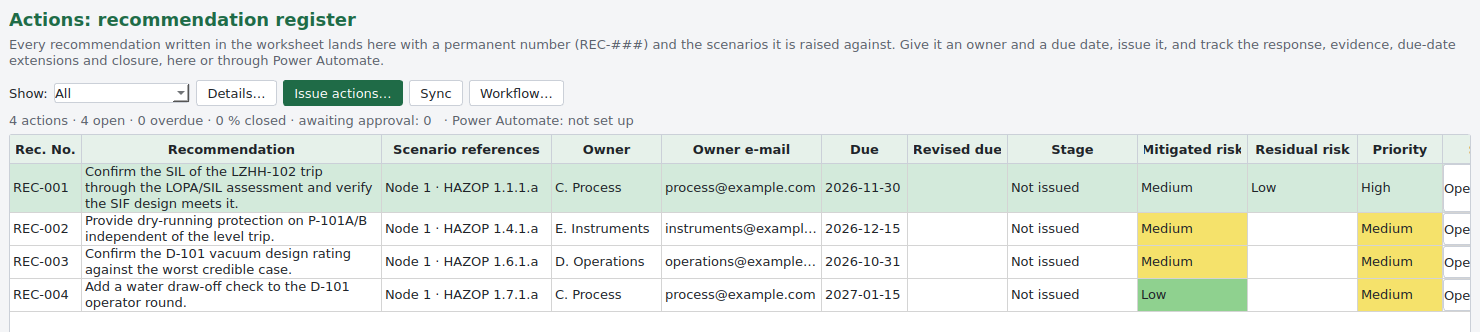
Actions through to closure

Carries forwardREC numbers, owners, due dates and history

Anything written in a Recommendations cell lands in one register with a permanent REC‑### number and its scenario references. Each action has an owner, a due date, a stage from not issued to closed, the owner's response and evidence, verification and a full history. Actions can be issued, extended and closed inside PHAx or through Microsoft Power Automate.

PHAx: Actions through to closure

The whole study, in your risk matrix

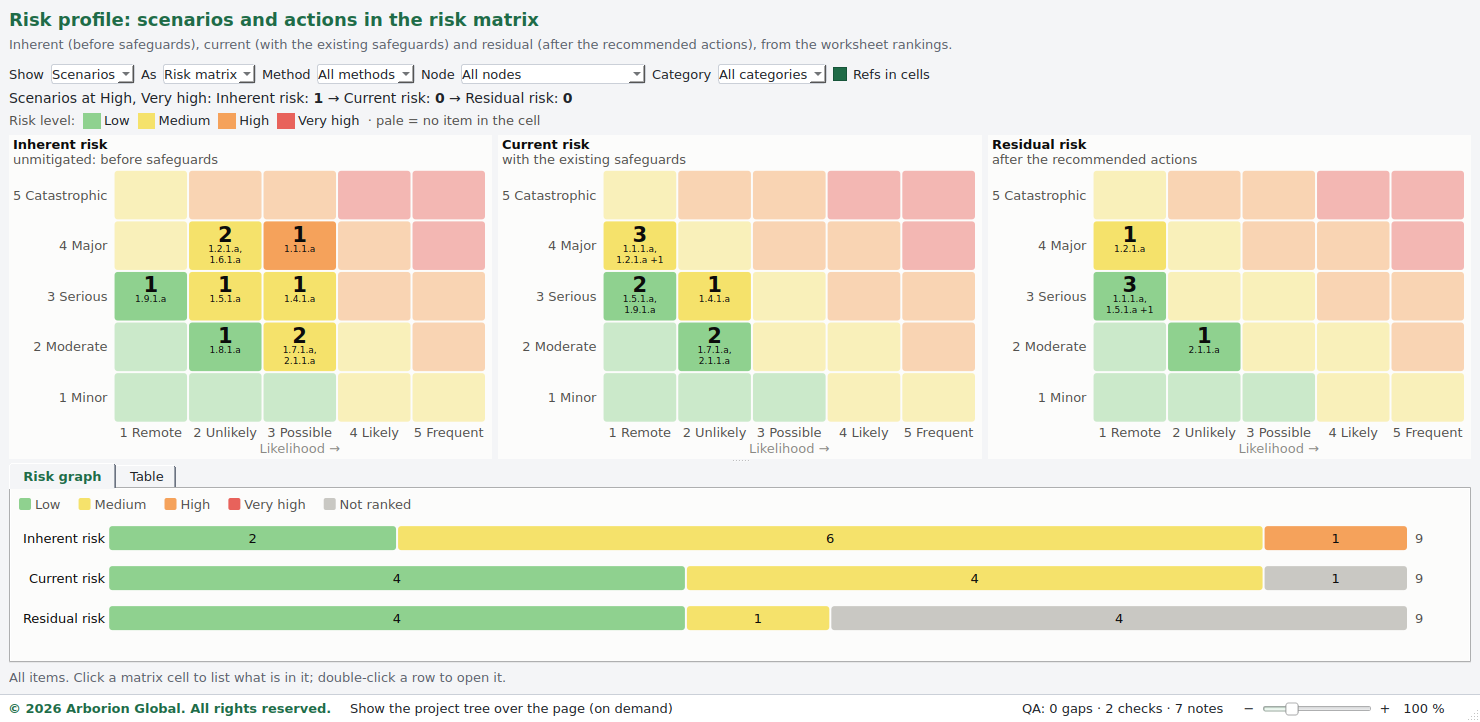
The risk profile plots every scenario three times: inherent, with the existing safeguards, and after the recommended actions. A row with an action but no residual ranking is shown as a gap, never guessed.

PHAx risk profile: inherent, current and residual risk matrices side by side with a risk graph

Excel workbook that still calculates

Every risk cell is a lookup on the study's risk matrix, S and L cells have dropdowns from the matrix, and the LOPA sheet keeps its IEL, required PFD and RRF as live formulas. Change a value in Excel and the risk follows.

Word study report

Introduction, methodology, risk matrix, team and attendance, recommendations, LOPA and assumptions, with the worksheets and the open gaps as appendices. Cell formatting is carried across.

QRA hand-off

Loss of containment scenarios exported in CSV or JSON with permanent SCN references. Release size, inventory, conditions and weather are listed as data gaps for the QRA, never filled in by the software.

Gaps are listed, not hidden

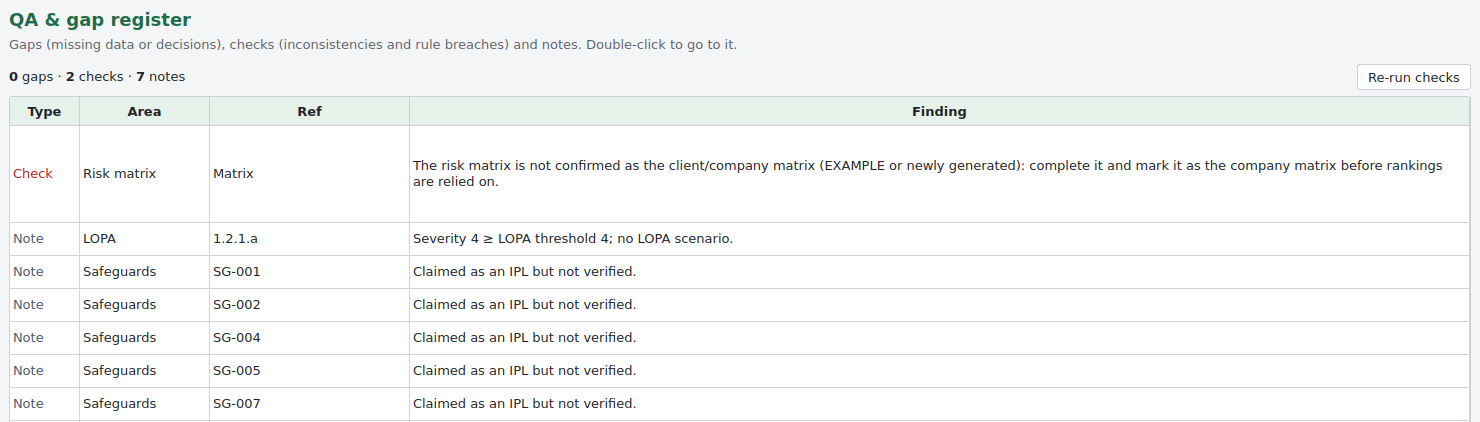
The QA register lists missing data, inconsistencies and rules that are not met while the study is recorded: an example risk matrix still in use, a severity above the LOPA threshold with no LOPA, an IPL that is claimed but not verified. Double-click a finding to go to it.

PHAx QA and gap register listing checks and notes with their area and reference

Built for the scribe in the room

Works like a spreadsheet

A ribbon, in-cell editing, a formula bar, cut, copy and paste of rows, fill down, filters, zoom and full screen. Commands grey out when they do not apply.

P&ID markup

Import drawings in bulk as PDF or images and mark each node's extent with a highlighter, a box or a tag in the node's colour.

Park a question

Right-click any cell to put an open question in the parking lot. The cell keeps a marker until the item is closed.

Spelling that knows the subject

HAZOP, LOPA, blowdown and knock-out are words, and tags, acronyms and numbers are left alone. UK and US spelling are both accepted.

Formulas and units written properly

One click writes H₂S, m³/h and 1×10⁻⁴ in the selected cells, in a form that looks the same in Excel and Word.

Workflow and site dashboard

Issue actions, approve extensions and closure, and submit the study for review, in PHAx or through Microsoft Power Automate. The dashboard shows every study and action on the site.

Why it records the way it does

Shaped by studies, corrected by studies

Every awkwardness in the recording model was found by our own leaders and scribes in live sessions, not in a specification workshop. When a field slows a study down it gets changed, because we are the ones sitting in the room when it does.

No invented data

Values the team has not given, such as an initiating event frequency, a PFD, a target or a missing ranking, stay blank and appear as gaps. Typical LOPA values are offered as a pick-list with their source written into the record, to be verified against the company register.

A record that can be trusted later

Saves are atomic and keep a backup. Every save adds to a hash-chained history, so an edit made outside PHAx is detected when the study is opened. Revisions can be issued frozen and compared with the current record, and each day's work can be kept in its own dated file.

What it is not

PHAx records and structures a hazard study. It does not chair one. The quality of a study still rests on an independent competent leader, accurate drawings and a team willing to disagree with the design, and no software changes that.

Installation
Desktop application for macOS (Apple silicon) and Windows 10 or 11. Studies are files on your own computers and drives. They are never sent to Arborion.
Activation
No licence keys and no web sign-in: each user creates an Arborion account in PHAx with the licence e-mail, confirmed by a code sent to that address, and PHAx activates the computer automatically. Each computer uses one seat; reinstalling on the same computer only needs signing in again, and signing out in PHAx frees the seat for another computer.
Offline use
The licence is checked online every 7 days and after each update; in between PHAx works offline. Only the licence check goes over the internet, never study content. Each computer needs an internet connection now and then: computers that are never online are not supported.
Interoperability
Excel workbook with live risk formulas, Word report, QRA hand-off in CSV or JSON, and action workflow through Microsoft Power Automate.
Competency
Leader and scribe training covering node selection, recording discipline and the independent protection layer test.
Technical support
Supported by practising study leaders, so a method question is answered by someone who chairs studies.
Run your next study in PHAx

Download PHAx for your computer and start a free trial in the app, or sign in with your Arborion account to buy a licence. We can also chair the study and scribe it in PHAx for you. Arrange a session

Download for macOSmacOS 11 or later, Apple silicon
Download for WindowsWindows 10 or 11, 64-bit

Free trial: start it in PHAx after you download it. More users, a partner deal or a special arrangement? Ask Arborion

Using PHAx is subject to the PHAx Terms of Use and the PHAx Privacy Statement. Cancellations are refunded pro rata under the Refund and Cancellation Policy. Your studies stay on your own computers. Licences, trials and support: support@arborionglobal.com.